
Planning a trip can be exciting, but finding affordable airfare often feels overwhelming. If you’ve been searching for how to use Google Flights, you’re already looking at one of the most powerful travel planning tools available today. Whether you’re booking a quick domestic getaway, an international vacation, or a business trip, Google Flights helps travelers compare prices, monitor fare changes, and discover flexible travel options in just a few minutes. With new travel trends emerging in 2026 and airlines continuing to adjust pricing based on demand, learning to use this platform effectively can make a noticeable difference to your travel budget.
What Is Google Flights?
Google Flights is a free flight search engine developed by Google that allows users to compare airfare from hundreds of airlines and online booking partners. Instead of acting as a travel agency, it gathers pricing information from multiple sources and presents it in an easy-to-understand format.
Once you’ve selected the itinerary that best matches your schedule and budget, Google Flights directs you to the airline or an approved booking partner to complete your reservation.
The platform has earned a reputation for its speed, intuitive design, and useful travel planning features. Rather than spending hours browsing multiple airline websites individually, travelers can review a wide range of options in seconds.
Why Google Flights Has Become So Popular
Travelers increasingly rely on Google Flights because it simplifies one of the most frustrating parts of planning a trip—comparing ticket prices.
Some of its biggest advantages include:
- Extremely fast search results
- Easy-to-read flight comparisons
- Flexible travel date tools
- Price history and fare insights
- Route recommendations
- Nearby airport comparisons
- Real-time fare updates
- Mobile-friendly experience
- Free access without subscriptions
Its clean interface also makes it suitable for both experienced travelers and people booking flights for the first time.
Understanding How Google Flights Works
It gathers available fares from participating airlines and travel providers, then organizes them based on several important factors such as:
- Ticket price
- Total travel time
- Number of stops
- Departure time
- Arrival time
- Airline
- Cabin class
The results update quickly whenever you modify your travel dates, airports, or filters, allowing you to experiment with different combinations until you find the best itinerary.
Getting Started
Using Google Flights requires very little preparation.
Simply open the service in your browser and begin entering your travel information.
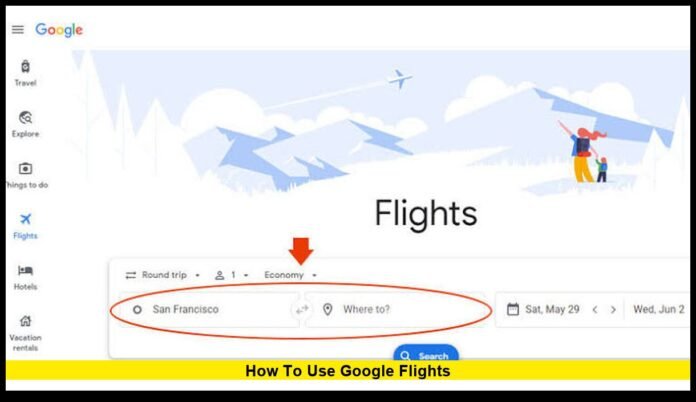
The homepage allows you to select:
- Departure airport
- Destination
- Travel dates
- Number of passengers
- Cabin class
- Trip type
Available trip types include:
- Round-trip
- One-way
- Multi-city
Each option is designed to support different travel needs, whether you’re taking a weekend vacation or planning a more complex international itinerary.
Choosing Departure Airports Wisely
One feature that many travelers overlook is the ability to search from multiple departure airports.
For example, someone living near New York might compare flights from:
- JFK
- Newark
- LaGuardia
Travelers in Southern California can compare:
- Los Angeles
- Burbank
- Long Beach
- Orange County
Searching multiple airports often reveals surprisingly large price differences, especially during busy travel seasons.
Driving an extra 30 or 40 minutes to another airport could reduce airfare by hundreds of dollars for a family.
Searching Flexible Destinations
Not everyone begins planning with a specific destination in mind.
Google Flights includes an Explore feature that allows users to search almost anywhere in the world based on their budget and preferred travel dates.
Instead of selecting a city, travelers simply choose their departure airport and indicate when they’d like to travel.
The map then displays destinations with current airfare estimates, making it easy to discover places that fit both your schedule and your budget.
This feature has become increasingly popular among travelers looking for spontaneous vacations or affordable international trips.
Finding the Best Travel Dates
Airfare changes constantly.
A ticket that costs $450 today might drop to $320 tomorrow or increase to $600 by next week.
Google Flights includes several tools that help travelers identify less expensive travel dates.
Calendar View
The calendar displays fares across an entire month, allowing users to compare prices before selecting departure and return dates.
Lower fares are immediately visible, making it easier to shift travel plans by a day or two.
Date Grid
The Date Grid compares multiple departure and return combinations simultaneously.
Instead of checking each itinerary individually, travelers can quickly see which date combinations offer the lowest overall price.
Price Graph
For certain routes, Google Flights also displays a graph showing how airfare changes over several days or weeks.
This helps travelers recognize patterns in airline pricing.
Setting Up Price Tracking
One of the platform’s most useful features is automated price tracking.
Instead of checking airfare every day, users can enable fare alerts for specific routes.
Whenever ticket prices change significantly, Google sends an email notification.
Price tracking works well for:
- Holiday travel
- Summer vacations
- Business trips
- International flights
- Family travel
This feature allows travelers to monitor fares without repeatedly performing manual searches.
Filtering Search Results
Large airports may have hundreds of available flights each day.
Google Flights includes numerous filters that simplify the search process.
Travelers can narrow results based on:
Number of Stops
Choose:
- Nonstop
- One stop
- Two or more stops
Airline Preference
Users who collect airline loyalty points can limit results to preferred carriers.
Cabin Class
Available options include:
- Economy
- Premium Economy
- Business
- First Class
Flight Duration
Some travelers prefer shorter itineraries even if they cost slightly more.
Duration filters eliminate lengthy layovers.
Price Range
Budget filters prevent expensive itineraries from dominating search results.
Departure and Arrival Times
Morning, afternoon, evening, or overnight departures can all be selected according to personal preferences.
Understanding Fare Insights
Modern airline pricing changes rapidly based on demand, seasonality, competition, and remaining seat inventory.
Google Flights attempts to simplify this complexity by providing fare guidance.
You may encounter messages indicating that a fare is:
- Lower than usual
- Typical for this route
- Higher than expected
These comparisons are based on historical pricing patterns for similar itineraries.
Although future prices can never be guaranteed, these insights often help travelers decide whether booking immediately is a sensible choice.
Carbon Emissions Information
Sustainability has become an increasingly important consideration for many travelers.
Google Flights estimates the carbon emissions generated by individual flights and compares them with typical emissions for similar routes.
Flights producing fewer emissions are often highlighted, allowing environmentally conscious travelers to make more informed decisions.
While environmental impact may not determine every booking decision, the information provides additional transparency during trip planning.
Booking Multi-City Trips
Not every vacation follows a simple round-trip schedule.
Travelers exploring multiple destinations can use Google Flights’ multi-city search.
For example:
- Chicago to London
- London to Rome
- Rome to Chicago
Rather than purchasing several separate tickets manually, travelers can organize an entire itinerary within one search.
This feature is especially useful for European vacations, business travel, and extended international journeys.
Smart Strategies for Lower Airfare
Experienced travelers often use a combination of techniques instead of relying on a single search.
Among the most effective strategies are:
Compare Multiple Airports
Nearby airports frequently offer significantly different prices.
Be Flexible With Dates
Traveling one or two days earlier or later may produce substantial savings.
Fly During Off-Peak Periods
Midweek departures are often less expensive than Friday or Sunday flights.
Book Before Peak Demand
Waiting until the final days before departure often results in higher prices, particularly during holidays.
Monitor Prices
Using fare alerts eliminates much of the guesswork involved in deciding when to purchase tickets.
Common Mistakes Travelers Make
Even experienced travelers sometimes overlook opportunities to save money.
Some of the most common mistakes include:
- Booking the first available flight without comparing alternatives
- Ignoring nearby airports
- Traveling only on weekends
- Waiting until the final week before departure
- Forgetting to compare one-way and round-trip fares
- Overlooking baggage costs
- Choosing very short layovers that increase the risk of missed connections
Avoiding these errors can improve both the travel experience and the overall cost of a trip.
Is Google Flights Accurate?
Google Flights is widely regarded as one of the fastest airfare comparison tools available.
However, airline prices change constantly.
Occasionally, fares displayed during the search process may change before the booking is completed.
This usually occurs because airline inventory updates in real time.
For that reason, travelers should complete reservations promptly once they find a fare that matches their budget.
Booking Through the Airline
After comparing prices, many travelers choose to book directly with the airline.
Booking directly can provide advantages such as:
- Easier flight changes
- Faster customer support
- Simpler refund requests
- Frequent flyer point accumulation
- Access to airline-specific promotions
Google Flights often directs users to the airline’s own booking page, making the transition seamless.
Mobile Travel Planning
Google Flights works equally well on smartphones, tablets, and desktop computers.
Mobile users can:
- Search flights
- Track prices
- Compare airports
- Review itineraries
- Receive fare alerts
This makes it convenient for travelers who prefer planning trips while commuting or during breaks.
When Should You Book?
There is no universal rule that guarantees the lowest airfare.
Pricing depends on numerous factors including:
- Destination
- Season
- Airline competition
- Holidays
- Local events
- Seat availability
Generally, many travel experts recommend beginning searches several months before departure for international trips and several weeks ahead for domestic travel.
Rather than focusing on a specific number of days before departure, monitoring fares over time often produces better results.
Who Can Benefit From Google Flights?
The platform serves a wide range of travelers.
It is useful for:
- Families planning vacations
- Students studying abroad
- Business travelers
- Digital nomads
- Frequent flyers
- Budget-conscious travelers
- Couples planning holidays
- Solo adventurers
Its flexible search tools adapt well to different travel styles and budgets.
Frequently Asked Questions
Is Google Flights free?
Yes. Anyone can use Google Flights without paying subscription fees or search charges.
Can Google Flights predict future prices?
The platform provides historical fare insights and pricing trends, but future airfare cannot be guaranteed because airline pricing changes continuously.
Does Google Flights include budget airlines?
Many low-cost carriers appear in search results, although participation varies depending on the airline and region.
Can I search without choosing a destination?
Yes. The Explore feature allows users to browse destinations worldwide based on their travel dates and departure airport.
Is Google Flights useful for international travel?
Absolutely. It compares international routes just as effectively as domestic flights and offers flexible search tools that can help identify more affordable travel dates and airports.
Final Thoughts
Learning how to use Google Flights is one of the easiest ways to improve your travel planning experience. Instead of visiting numerous airline websites individually, you can compare fares, evaluate schedules, monitor changing prices, and explore alternative destinations through a single, easy-to-use platform. While airfare will always fluctuate according to demand and availability, making full use of features such as flexible date searches, price tracking, nearby airport comparisons, and travel insights can help travelers make more informed booking decisions. Whether you’re planning your next holiday months in advance or searching for a last-minute escape, Google Flights remains one of the most practical resources available for finding flights that balance convenience, value, and flexibility.