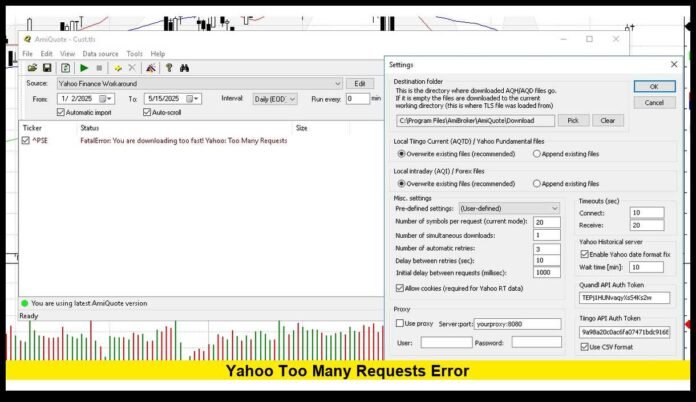

The Yahoo too many requests error has become a growing frustration for American users trying to access Yahoo Mail, Yahoo Finance, and connected services in 2026. This warning appears when Yahoo’s systems temporarily block activity after detecting an unusually high number of requests from a single browser, app, or network. Instead of loading content, users may be met with a message stating that access has been limited or that the service cannot process additional requests at that moment.
This situation is not the result of a nationwide outage. It is a traffic-control and security response designed to protect Yahoo’s infrastructure and user accounts from overload, automation, and suspicious behavior. Understanding how the system works can help users restore access faster and prevent the problem from recurring.
What the Error Indicates
When the Yahoo too many requests error appears, it means Yahoo’s servers have received more connection attempts, data pulls, or login actions from one source than allowed within a short time window. To maintain stability and prevent abuse, the system enforces a temporary cooldown period.
During this period:
- Login attempts may be blocked
- Mailboxes may fail to load
- Finance pages may not refresh
- Third-party apps may lose connection
Once the request rate drops below the threshold, access usually returns automatically.
Why Yahoo Enforces Request Limits
Modern web platforms handle billions of interactions daily. To maintain speed, security, and reliability, they rely on automated controls that detect unusual traffic patterns. Yahoo uses these limits to:
- Protect user accounts from brute-force attacks
- Reduce strain on mail and data servers
- Block scraping and automated harvesting
- Prevent system slowdowns during traffic spikes
- Shield infrastructure from denial-of-service attempts
These protections operate continuously and apply to both human users and software clients.
Most Common Triggers for U.S. Users
1. Rapid Login Attempts
Repeated sign-in attempts within seconds or minutes can activate security throttling. Even legitimate users can trigger it after mistyping passwords several times or switching between devices too quickly.
2. Constant Page Reloading
Refreshing inboxes, stock charts, or portfolio pages many times in a short period creates bursts of server calls that may cross allowed limits.
3. Aggressive Email Sync Settings
Desktop and mobile email clients can poll Yahoo servers every few seconds if misconfigured. This steady stream of background requests can lead to temporary blocking.
4. Financial Data Monitoring Tools
Applications that track prices, historical charts, or market movements through frequent automated queries may exceed permitted request volumes.
5. Shared or Rotating IP Addresses
VPNs, corporate networks, and public Wi-Fi often route many users through the same IP. Yahoo’s systems may interpret the combined activity as excessive traffic from a single source.
Where the Error Is Most Often Seen
The Yahoo too many requests error typically affects:
- Yahoo Mail web interface
- Yahoo Mail mobile applications
- Yahoo Finance quote pages and charts
- Third-party email software using IMAP or SMTP
- Browser sessions with many open Yahoo tabs
The message may vary in wording, but the underlying condition remains the same: request limits have been temporarily exceeded.
How Long Restrictions Usually Last
The duration of access limits depends on how strongly the system’s thresholds were crossed.
- Minor overuse: a few minutes
- Repeated login failures: one to several hours
- Heavy automated traffic: up to a full day
During this time, continued attempts may extend the cooldown.
Step-by-Step Ways to Restore Access
Pause Activity
Stop refreshing pages or retrying logins. Give the system time to reset the connection counter.
Clear Browser Data
Removing cookies and cached files forces a fresh session and often resolves looping request behavior.
Switch Browsers or Devices
Accessing Yahoo from a different browser, phone, or computer can isolate the blocked session.
Turn Off VPNs and Proxies
Connecting directly through your home or mobile network reduces the chance of inherited rate limits.
Adjust Email Client Settings
For desktop or mobile mail apps:
- Increase the time between inbox checks
- Avoid continuous background syncing
- Use dedicated app passwords where supported
- Ensure only one device is actively syncing at a time
Reduce Automated Activity
For financial tools and monitoring software:
- Increase delays between data requests
- Limit the number of simultaneous connections
- Avoid repeated full-history downloads in short periods
Preventing the Error in the Future
U.S. users can significantly reduce the chance of encountering this issue by adopting a few habits:
- Enter login credentials carefully to avoid repeated failures
- Avoid refreshing pages every few seconds
- Keep only necessary Yahoo tabs open
- Configure email clients to check mail at reasonable intervals
- Log out properly instead of closing active sessions abruptly
- Use stable residential internet rather than crowded public networks
These steps keep request patterns within normal operating ranges.
How This Affects Yahoo Mail Users
For email users, the Yahoo too many requests error may appear as:
- Inbox failing to load
- Attachments not opening
- Temporary login lockouts
- Sync errors in desktop clients
- Delayed delivery notifications
Most of these resolve automatically once the rate limit window passes, provided further requests are minimized.
How This Affects Yahoo Finance Users
For investors and traders, the impact can include:
- Quotes not updating
- Charts freezing
- Portfolio pages timing out
- Data pulls failing in tracking software
- Delays in price refresh during market hours
Spacing out refresh actions and reducing automated pulls usually restores normal performance.
Distinguishing Rate Limits From Outages
It is important not to confuse this error with a full platform outage. A true outage affects millions of users simultaneously and results in widespread service failures. Rate limiting, by contrast, affects individual accounts, sessions, or networks based on usage patterns.
If other users are accessing Yahoo normally while one account cannot, the cause is almost always request throttling rather than system downtime.
Security Role of the Limitation System
Beyond traffic management, request limits serve a vital security role:
- They stop automated password-guessing attempts
- They prevent credential-stuffing attacks
- They block mass data extraction
- They reduce the risk of account takeover
- They stabilize service during peak usage hours
This protective layer helps ensure that legitimate users retain long-term access and data safety.
Business and Professional Impact
For professionals who rely on Yahoo Mail or Yahoo Finance for daily operations, temporary blocks can disrupt:
- Client communication
- Market monitoring
- Research workflows
- Automated reporting tools
- Portfolio management dashboards
Planning for reasonable access intervals and maintaining backup communication channels can reduce operational impact.
Mobile vs Desktop Behavior
Mobile apps tend to manage background requests more efficiently than desktop browsers with multiple open tabs. However, push notifications, real-time sync, and auto-refresh features can still contribute to high request volumes if several devices are logged into the same account.
Limiting active sessions across devices can help maintain stable access.
Key Takeaways for U.S. Users
- The Yahoo too many requests error is a protective rate-limit response, not a system failure.
- It is triggered by high-frequency activity from one account, app, or network.
- Most blocks clear automatically after a cooldown period.
- Simple adjustments to browsing, syncing, and automation habits can prevent repeat occurrences.
- The system plays a crucial role in security, stability, and service reliability.
If you have encountered the Yahoo too many requests error recently, share how it affected your access and what helped restore it. Your experience can help other readers navigate similar situations and stay informed as usage patterns and security systems continue to evolve.