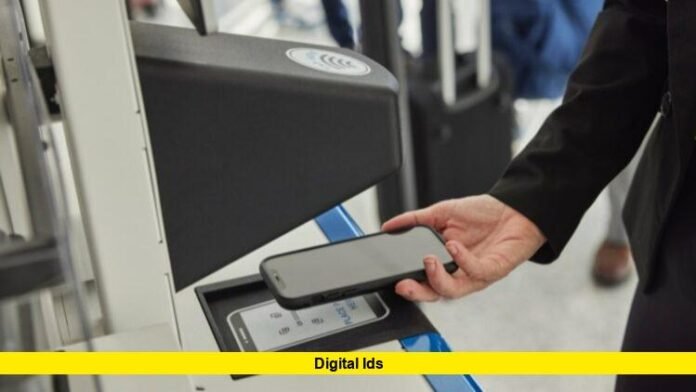

Travelers now have a fresh and compelling reason to explore the concept of digital ids. With its latest update, Apple lets U.S. passport holders add their travel document directly into the Wallet app on iPhone and Apple Watch, and present it at over 250 domestic airport checkpoints operated by the Transportation Security Administration (TSA).
What the rollout looks like
The feature is available in beta form at more than 250 U.S. airports. U.S. passport holders with compatible Apple devices can scan their passport’s photo page and embedded chip, then perform a live selfie/facial-movement verification. Once approved, the credential is stored securely in the Apple Wallet. At the TSA checkpoint you simply open Wallet, select your digital ID, hold your device near the reader, confirm the requested data, authenticate (Face ID/Touch ID or passcode) and proceed—without handing over your phone. Importantly, this digital ID does not replace your physical passport for international travel or border crossings.
Why this matters for digital ids
This rollout marks a significant shift in how identity is verified in travel scenarios:
- It broadens access: even in places where digital driver’s licences aren’t yet accepted, a U.S. passport in Wallet gives you a digital ID path.
- It strengthens security: the credential is encrypted, stored on the device, requires biometric or passcode authentication, and shares only the fields you approve.
- It increases convenience: your iPhone or Apple Watch becomes your ID presentation device, streamlining the go-through-security process.
- It signals the future: digital ids are more than novelty—they’re becoming practical travel tools.
Step-by-step: How to set up your digital ID
- Make sure you have a compatible device (iPhone 11 or later, or Apple Watch Series 6 or later) running the latest operating system.
- Open Wallet on your iPhone, tap Add (+), then select “Driver’s License or ID Cards” → “Digital ID”.
- Scan your passport’s photo page and use your iPhone to read the embedded chip.
- Take a selfie and follow the prompts to complete the live-motion check.
- After verification, your digital ID appears in Wallet and can be used at participating TSA checkpoints.
- At the checkpoint, double-click the side or Home button, select your Digital ID, hold near the reader, review what info is being requested, authenticate, and proceed.
- Until full rollout is universal, carry your physical passport as a backup—some lanes may still require traditional ID.
Where and when digital ids are accepted
The initial rollout covers domestic travel at airports in the U.S.; more than 250 airports have implemented compatible TSA lanes. While many airports now support the digital ID presentation, not all lanes or all airports may be ready yet. This means that although your travel path may support the feature, it’s wise to check ahead. For now, international travel and border crossings still require the physical passport; the digital version cannot replace that function just yet.
What this means for you as a traveler
Pros:
- Potentially faster progress through security if your airport lane accepts the digital ID.
- Reduced need to carry and present physical ID cards – your device becomes your credential.
- Stronger privacy and security controls built into the digital ID model.
Cons / Things to know:
- The system is still rolling out; some checkpoints might not yet support it, or signage may not yet clearly reflect it.
- Your device still must be charged and functional—if it dies or malfunctions, you’ll need your physical passport backup.
- For international flights or border crossings, physical passport remains mandatory.
- Like any new process there may be hiccups—allow extra time and carry your physical documents for backup.
How digital ids fit the broader identity ecosystem
The concept of digital ids is no longer futuristic—it’s acting in live travel scenarios. Governments and tech companies have long explored phone-based driver’s licences and state IDs; this passport-to-wallet step opens the door to far broader adoption. Soon, digital ids may be used for hotel check-in, rental car access, age verification, secure enterprise access—and not just at airports. With the foundation of secure on-device storage, biometric unlocking, and selective data sharing, the value proposition of digital ids extends well beyond travel.
FAQ: Digital IDs – Common questions
| Question | Answer |
|---|---|
| Can the digital ID fully replace my physical passport? | No—especially for international travel or border crossings, you still need the physical document. |
| Which devices are compatible? | iPhone 11 or later, or Apple Watch Series 6 or later, with the latest OS. |
| Is it accepted everywhere right now? | Not yet—only participating TSA checkpoints at over 250 U.S. airports for now. |
| How secure is the system? | The data is encrypted and stored on-device, users review which fields are shared, and you authenticate via biometrics or passcode. |
| Should I still carry my physical passport? | Yes—until you’re confident your travel route supports the digital version and you’re comfortable relying on it. |
What’s next for digital ids?
The rollout of digital ids via the passport-in-Wallet path signals several trends:
- Expanded airport and TSA lane support, ideally moving to full nationwide coverage.
- Incorporation of state driver’s licences or state IDs into the same digital credentials ecosystem.
- Adoption beyond travel: digital ids for retail, hospitality, access control, online verification.
- Cross-device and cross-platform solutions, potentially beyond Apple to include Android and other ecosystems.
- More attention on user privacy and control: as digital ids become mainstream, users will demand clarity, minimal data sharing, and strong protection against misuse.
Final word
The moment is here: digital ids are no longer “coming someday”—they’re available now for many U.S. travelers with eligible Apple devices and valid passports. If you meet the requirements, setting up your digital ID in your wallet could simplify your next domestic flight. Just don’t ditch your physical passport yet—carry it as backup, ensure your device is ready, and enjoy the convenience when it works.
We’d love your thoughts — will you take the plunge with a digital ID on your next flight? Share your opinions or ask any questions below.