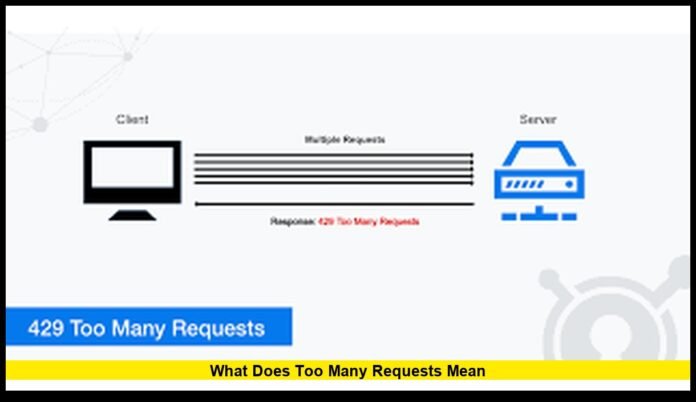

What does too many requests mean is a question that arises for millions of users when a website suddenly blocks access, an app stops loading, or a login page refuses to continue. This message reflects a real, active control system used across the modern internet. It appears when a server detects that the number of incoming actions from a user, device, or application has crossed a defined limit within a short period.
Rather than indicating a broken page, the message signals that traffic is temporarily restricted to protect performance, security, and fairness. It is now a standard part of how online platforms in the United States manage digital demand.
Understanding the Core Meaning
At its core, “Too Many Requests” means a server is receiving more actions than it is willing to process during a specific time window. Every click, page load, search, login attempt, or background sync counts as a request. When these accumulate too quickly, automated protection systems activate and slow or block further access.
This process is known as rate limiting. It ensures that no single user, device, or automated program consumes an excessive share of server resources.
The goal is not to deny service, but to regulate traffic so that:
- Websites remain responsive
- Apps continue functioning smoothly
- Systems are protected from overload
- All users receive fair access
Why Rate Limiting Exists
The internet operates on shared infrastructure. Servers must handle millions of interactions each second, often from around the world. Without controls, a surge from a single source could degrade performance for everyone.
Rate limiting helps prevent:
- Server crashes
- Network congestion
- Automated scraping
- Password-guessing attacks
- Data abuse
- Infrastructure instability
By controlling how often requests can be made, platforms protect both users and their own systems.
Common Triggers Behind the Message
Repeated Page Reloading
Rapidly refreshing a page sends a burst of identical requests. Some sites interpret this as suspicious or excessive behavior and temporarily block further attempts.
High-Frequency App Activity
Mobile and desktop apps that sync too often can exceed limits, especially when background updates run continuously.
Automated Tools and Scripts
Programs that collect data, monitor prices, or run tests may send hundreds of requests per minute. If not properly throttled, they can trigger protective restrictions.
Login and Authentication Attempts
Security systems restrict repeated sign-in attempts to prevent account compromise. When limits are crossed, further requests are delayed or blocked.
Shared Network Environments
Offices, universities, hotels, and public Wi-Fi often route many users through one address. Combined activity can reach thresholds even if each individual is browsing normally.
What the Server Is Actually Saying
When the system responds with “Too Many Requests,” it is communicating three key facts:
- The request format is valid.
- The number of requests in the current time window is too high.
- Access will be restored once activity slows down.
It is a traffic control message, not a malfunction notice.
How Long Restrictions Typically Last
Most rate limits are temporary. The duration depends on the platform and the severity of the traffic spike.
Typical timeframes include:
- A few seconds for minor overuse
- One to five minutes for repeated actions
- Longer cooldowns for automation
- Extended blocks for ongoing abuse
Once the request rate falls below the allowed threshold, access usually resumes automatically.
The Role of Automation and Bots
Modern websites face constant automated traffic. Search crawlers, monitoring tools, scrapers, and malicious bots all generate requests. Rate limiting helps differentiate between healthy usage and harmful volume.
Systems analyze:
- Request frequency
- Access patterns
- Behavioral consistency
- Geographic distribution
- Repetition speed
When patterns exceed normal human behavior, servers respond with traffic controls.
Impact on Everyday Users
For the average person, this message may appear while:
- Logging into an account multiple times
- Reloading a slow page repeatedly
- Submitting forms in quick succession
- Using apps that refresh constantly
- Switching networks rapidly
The experience is usually brief. Waiting a short time resolves the issue in most cases.
How Businesses and Platforms Use It
Large platforms rely on traffic management to maintain reliability. Streaming services, payment processors, social networks, and cloud systems all apply rate limits.
This allows them to:
- Maintain consistent performance
- Prevent service interruptions
- Protect user data
- Control infrastructure costs
- Balance global demand
Without such controls, peak usage periods could disrupt service nationwide.
How It Affects Website Performance and Visibility
Search engines and monitoring systems also respect request limits. When a site frequently returns restriction responses, automated services may slow their activity to avoid overloading the server.
For website operators, this means:
- Optimizing server capacity
- Adjusting rate thresholds
- Separating human traffic from automated access
- Ensuring essential services are never blocked
Proper configuration ensures stability without limiting legitimate visitors.
How Developers Design Around Request Limits
Technical teams implement safeguards such as:
- Request queues
- Traffic shaping
- Load balancing
- Caching layers
- Progressive backoff systems
- Usage monitoring dashboards
These tools allow applications to operate efficiently within allowed boundaries.
How Users Can Reduce the Chances of Seeing It
Practical steps include:
- Avoid constant refreshing
- Allow pages time to load
- Wait before retrying failed actions
- Limit repeated login attempts
- Use stable connections
- Close and reopen stalled apps
These actions help maintain a normal request pattern.
Security Benefits
Traffic limits play a critical role in cybersecurity. They help block:
- Credential-stuffing attacks
- Automated form abuse
- Data scraping
- Enumeration attempts
- Brute-force intrusions
By slowing attackers, systems gain time to detect and neutralize threats.
Why the Message Is Increasingly Common
Digital services are growing rapidly. More people, more devices, and more automation mean higher request volumes. Artificial intelligence tools, cloud computing, and real-time analytics all rely on constant server communication.
To handle this growth safely, platforms rely more heavily on:
- Traffic thresholds
- Behavioral analysis
- Dynamic request limits
- Adaptive protection systems
This makes “Too Many Requests” a normal part of modern web operations.
Distinguishing Temporary Limits from Account Blocks
A rate-limit response is temporary and automated. It differs from account suspension, which involves policy violations and requires manual review.
Key differences:
- Rate limits reset automatically
- Account blocks require investigation
- Traffic controls are system-wide
- Suspensions are user-specific
Understanding this distinction prevents unnecessary concern.
Why Understanding This Matters
Knowing what does too many requests mean helps users respond calmly instead of assuming something is broken. It also helps businesses design better systems and protect their digital assets.
It reflects:
- How modern servers manage load
- How platforms protect availability
- How security systems prevent abuse
- How fairness is enforced across networks
Rather than a failure, it is a sign that protective systems are working as intended.
The Bigger Picture of Internet Stability
Every online service depends on balanced traffic. From financial transactions to healthcare portals, from streaming platforms to government websites, controlled request flow ensures reliability.
Rate limiting supports:
- National infrastructure stability
- Data protection
- Service continuity
- Fair user access
- Cyber defense readiness
It is an invisible layer of protection that keeps the digital ecosystem functioning.
What does too many requests mean is not just a technical message. It is a signal that the internet is actively managing demand to keep services secure, fast, and accessible.
Have you encountered this message recently while browsing or using an app? Share your experience and stay tuned for more real-world tech insights.